







Skip to content
Media Cloud

Media Cloud for WordPress

Supercharge your WordPress site

Automatically push and serve your WordPress media from Amazon S3, Cloudflare R2, Google Cloud Storage, DigitalOcean Spaces, Backblaze and others. Turbocharge your performance by using content distribution networks like CloudFront, Cloudflare, Fastly and more. Use Imgix to future proof your site and optimize images on the fly.

7-day money-back guaranteeS3, R2, Google Cloud & more
Product tourMedia Cloud 4.0

Works With

Media Cloud integrates with a large number of cloud services like Amazon S3, Google Cloud Storage, DigitalOcean Spaces, Imgix and others.

  • Imgix
  • Amazon Web Services
  • Cloudflare
  • Google Cloud
  • Mux
  • DigitalOcean
  • Minio
  • Wasabi
  • Backblaze
  • DreamHost

Platform

Features

01

Cloud Storage

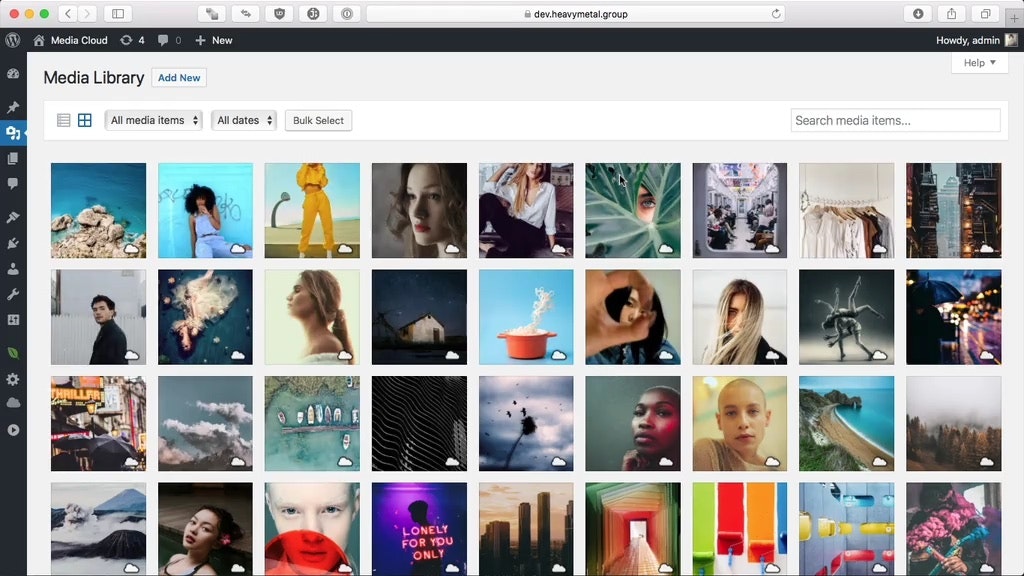
Media Cloud is seamlessly integrated with WordPress’s media library so that you can continue working with media in WordPress like you normally would – your regular workflows remain the same. The deep UI integration shows you information about your media on cloud storage in ways that make it feel like it’s a regular part of WordPress.

Direct uploads, a feature unique to Media Cloud, are integrated right into the standard WordPress uploader. Direct uploads allow you to upload your content straight to your storage provider, skipping WordPress altogether. With direct uploads, you’ll see upload speeds boosted by 400% on average.

02

Video Encoding

Media Cloud 4.0 adds video encoding, turning your WordPress site into your own private Vimeo or YouTube!

Using Mux’s encoding service, easily upload and convert your videos to adaptive bitrate videos that work great no matter the bandwidth or device. You can also add your own watermarks to the videos you upload and secure them with expiring links that ensure where your videos are viewed and by whom.

Also included are Gutenberg and Elementor blocks to easily embed these videos in your posts and pages. Bring your own player or use the embedded industry leading Video JS player.

03

Import Existing Media

Have an existing media library? Media Cloud can import your existing media to cloud storage in the background. Just start the import process and continue about your day. Browse Reddit, take a nap, enjoy some coffee, crush newbs in Apex Legends – whatever you choose to do, Media Cloud will continue the import process in the background. You can check on its status at any time by browsing to the import tool’s page in Media Cloud’s admin menu.

04

Assets

Media Cloud isn’t just limited to your media, it can now push your CSS and Javascript assets to the cloud to serve them from a CDN, or setup a CDN to pull from your server and have Media Cloud automatically rewrite those URLs.

Either way you choose to do it, the assets feature in Media Cloud is a major kick in the pants for your page loading times which has direct impact on Google ranking and user satisfaction.

05

Vision

Media Cloud integrates with Amazon Rekognition and Google Cloud Vision to enable you to process your images with powerful machine learning models.

Vision allows you to automatically tag images, detect celebrities, find faces and moderate explicit content. The face detection feature can be used to do smart focus cropping where images are automatically cropped with any faces centered in the crop.

06

Advanced Image Editor

This feature is a whole lot of wow. And, as far as we know, Media Cloud is the only plugin for WordPress that has a robust image editor that allows you tweak things like brightness, contrast, hue, saturation, exposure and other color controls. Blur, sharpen, auto enhance, red-eye reduction? Yes, please! You can also tint images, add borders and padding, perform arbitrary image rotations. You can also do smart cropping where images are automatically cropped to center and focus on the faces in the image!

You can create style presets and apply those presets to specific image sizes so that any image displayed at that size will be displayed using that preset. Awesome for creative treatments on hero images!

07

Image Cropping

Let’s face it, WordPress’s native cropping tool is cumbersome and antiquated. Media Cloud can replace it with a powerful and easy to use crop tool with an intuitive and modern UI.

The crop tool allows you to crop each individual image size you are using on your site easily. It provides a realtime preview so that you can see the exact crop you are going to get and it will remember your crops so that you can come back and tweak them at any time.

08

Watermarking

Media Cloud has built-in support for watermarking your images. You can choose to apply watermarks to specific image sizes, to all sizes, to specific images or to all images.

Watermarking is non-destructive meaning that you can change the watermark or its position or its size or any other of its attributes and every image will be automatically updated without having to regenerate anything.

09

Storage Browser

Easily browse your cloud storage from right within WordPress. The storage browser allows you to upload items to specific folders, import items to your media library, delete files and folders and view items in your cloud storage – all without leaving WordPress!

Testimonials

Trusted by More than 40,000 Blogs, Online Shops & Websites!

  • Fantastic support and plugin

    Works great out of the box and when we did encounter an error (That had nothing to do with this plugin, but with a core WP file), the developer responded to our request within about 20 minutes and worked with us to resolve it. Great support!

    techdaddies

    WordPress.org reviewer

  • Great Plugin

    I like this plugin because it’s easy to set up. Setting up my configuration to host my media files on Amazon S3 was straight forward, I didn’t even need to edit the wp-config.php file (Which can be kinda stressful.)

    iamntokozo

    WordPress.org reviewer

  • Fantastic Plugin, Loads of Features, Excellent Support

    What great plugin, I cannot begin to say how much better this is than its main competitor plugin (which i have used previously).

    The plugin comes with LOADS of features and settings, but at the core, is very simple to use and easy to setup.

    Jon has been amazing with support. I had an issue with my Amazon S3 and Cloudfront setup which is not entirely Jon’s responsibility, but he assisted me and even offered to do a video call with me to go through it all to ensure that the cloudfront was correctly setup.

    In the end, this works fantastically well on my site and I am grateful to Jon for the development of this plugin and his excellent support.

    Thanks

    supadigital

    WordPress.org reviewer

  • Solid plugin w full features and excellent support

    I’ve been building full stack web apps for 25 years. We needed a plugin that could be tailored to our approach of using load balanced AWS servers, S3 storage and CDN delivery of media. Media Cloud checks all the boxes, is easy to use, has good debugging details and when we needed assistance, the support was top quality. Worth your money.

    Creator Hosting

    WordPress.org reviewer

  • Awesome Plugin

    I purchased the Premium version and was great the support that came with it was amazing. I had a small issue with my site and Jon was quick to get it fixed.

    Don Gamache

    WordPress.org reviewer

  • Very useful

    Great tool and great space saver. Works great with other plugins.
    ÁL

    Ángel López RomeroVerified customer

    WordPress.org reviewer

  • "Great Support!"

    Media Cloud has Great support system to ty all the systems together, and fine tune it for the races. thank you Media Cloud.
    JC

    J. C. FlemonsVerified customer

    Owner

  • Excellent!!!/Excelente!!

    This plugin is great, now my site can provide images via cdn and my pagespeed rank gets improved, also my server free space is very appretiated!! BUY the pro version and you can upload all the images you already have! its GREAT and great support too!

    —————————–

    Les recomiendo mucho este plugin, fue el unico que pudo poner en cdn personalido las imagenes de mi sitio, estoy usando un droplet de digital ocean y funciona perfecto, les recomiendo comprar la version PRO esa sirve para subir las imagenes que ya estan en tu servidor.

    Peloncito

    WordPress.org reviewer

  • Fantastic

    I had a site full of images and didn't know what to do, this plugin solved the problem easily
    US

    ulisses schultzVerified customer

    WordPress.org reviewer

  • It’s a game changer

    You could cobble all this together on your own or just download this plugin and turn it on and go! Amazing job!
    BS

    Brandon SmithVerified customer

    WordPress.org reviewer

  • Best available choice & Experienced author

    The plugin developer is very experienced in the field and has offered great support for us in the last weeks even for out custom theme. There are a couple of support reviews that made me hesitant at first but i can assure you even if it takes a couple of days they respond and work on your request even if they don’t confirm that to you at the time you send hahaha.The plugin is also very well organized and works perfectly with imgix.

    Would definitely choose media cloud over any other plugin cause i tried them all, wp-stateless has very limited options and almost no support, wp offload media are extremely expensive and unnecessary but have good support. It’s also well priced to be honest. Thanks for all the help Jon 🙂

    nonprofit

    WordPress.org reviewer

  • A must for every WP install

    Amazing interface, simple wizard, lots of options, great support, a no brainer, MediaCloud is a must for every WP install.
    JO

    jorge OcampoVerified customer

    Editor, Superluchas

  • Easy fix to avoiding slow shared hosting of media files

    While I love my host, I know that because I'm on a shared server my media may not be served to visitors as quickly and efficiently as I would like, but I don't want to go to a virtual private server at the moment or pay for my own server. Media Cloud has not only allowed me to serve my media through my Amazon S3 (even showing me how to easily tap into CloudFront without too much setup), but the their videos showed me step by step how to easily set it up. I've gotten the added benefit of increasing my numbers on Google Pagespeed Insights and not upsetting my host provider. Win/win!
    AM

    Anthony MendezVerified customer

    Voice Actor and Dadministrator, Strip Dot Voice LLC

  • The Easiest Cloud Plugin with Advanced Features

    Was looking for a solution for our team's array of sites that we manage. We tried wp-stateless, Offload Media, and this one Media Cloud... Media Cloud seemed to be the most straightforward with a balance of advanced features and usability.
    A

    AlexVerified customer

    Co-Founder & Ops, Promethean Aesthetics

  • Amazing Features and Functionality with Excellent Support!

    I moved from Offload Media Lite to Media Cloud and couldn't be happier. Media Cloud is leaps and bounds ahead of Offload Media, particularly with the image editing integration and the direct-to-cloud upload capabilities. I had a question getting started and they were happy to do a screenshare with me to address it. Can't praise Media Cloud enough!
    MW

    Matt WoodwardVerified customer

    WordPress.org reviewer

  • Great Plugin for Automation

    A great plugin specially if you’re using it with environment variables like we do, we do a lot of automated deployments with the plugin installed and it works with S3 like a charm.
    Their support is also great and quick to respond to your emails.

    diablo2050

    WordPress.org reviewer

  • Very smooth and painless

    Migrated 40,000 images to DigitalOcean Spaces from existing Wordpress droplet with zero issues. Great plugin.
    KM

    Kevin MillerVerified customer

    Developer, Hollywares

  • Works great and Imgix REALLY sped things up too

    Working to get my membership site running faster and this REALLY helped. I love that all these images sidestep my site entirely. Media Cloud, S3, and Imgix are well worth it (Premium user here). Thanks for a great plugin.

    peeld

    WordPress.org reviewer

  • It works! And does so well

    It works! Easy to set up and the documentation is pretty good. Moved all my assets to S3
    TS

    Terry SeidlerVerified customer

    Di2Center

  • Solid.

    Well designed. The first proper media storage solution for WP I've seen. Add in Imgix and it's a game changer.
    CL

    Chad LancourVerified customer

    WordPress.org reviewer

  • Amazing Plugin, Amazing Support 110% recommended

    This plugin is a MUST-HAVE for anyone that is serious about their WordPress site. Before MediaCloud it was a painful process to get automatic syncing with Amazon S3 up and running, and even then there was still many limitations. With MediaCloud it makes everything a breeze. I haven’t even tapped into the other various features like auto image tagging, but I am sure they will blow me away just like the main MediaCloud plugin did.

    Again, I highly recommend MediaCloud and use it on every client site of mine.

    Matt Pramschufer

    WordPress.org reviewer

  • Perfect for my site

    Working as expected, great support and regular updates
    M

    mikerCZVerified customer

    AllThoseMen.com

  • Working as described and very useful

    After trying several media plugins, Media Cloud did the trick. Not only the plugin worked out of the box but its documentation helped to explain all of the additional settings and features. The plugin works very well with ImgIX and media stored on Digital Oceans Spaces. Only missing feature was a bulk update for media upload dates. This is helpful for uploading images that are older from archives. Thank you team Media Cloud!
    RB

    Robert BohacekVerified customer

    Owner, mpsWORKS

  • Best Plugin Ever Created

    I just want to say this is the best plugin that could have been published on wordpress.org so far. I can’t thank you enough for creating such an amazing plugin that works flawlessly with so many options. This is a game changer for wordpress and turns wordpress sites into super hero wordpress sites. This has increased my website speeds to be almost 4x faster than before.

    curranabell

    WordPress.org reviewer

  • Amazing plugin

    It meets all my expectations and I even had instant support, a mandatory plugin for those who need to have files in the cloud for wordpress to work light.

    chrislan21

    WordPress.org reviewer

  • Great Plugin for Digitalocean Spaces

    I use this on six websites to offload images to a single shared DO Space. It’s perfect and works perfectly. Ran into an issue in the first couple of days, turns out the issue was with Digitalocean, NOT the plugin! It’s free, easy-to-use, and a huge time saver. How could you possibly go wrong?

    michaelyorkpa

    WordPress.org reviewer

  • Fantastic plugin

    Working with this plugin and imgix feels like driving a Ferrari. Thanks a lot

    zeem11

    WordPress.org reviewer

  • Seriously impressive

    Have used this plugin on a few sites now w/ Google Cloud & Imgix, with absolutely no issues.

    kaqo

    WordPress.org reviewer

  • Just what I needed

    With the Backblaze and Cloudflare alliance this was exactly what I needed to get files into B2 and serve them through Cloudflare with no outbound transfer fees.

    alex.justesen

    WordPress.org reviewer

  • Will help you get to the high 90’s on Google PageSpeed

    Your server hosting the slow WordPress will thank you for using this plugin in addition to S3 and Imgix. Also, your theme development time is faster by cropping images on the fly. Using Media Cloud with S3 and Imgix enabled will give you a higher leap forward on Google PageSpeed than any other plugin.

    writ

    WordPress.org reviewer

  • Absolutely Love This Plugin

    I’ve used and suffered through other, older plugins that offered a fraction of what this plugin provides. For this product, it works as advertised, and even more besides. Six stars out of five, I cannot recommend this enough.

    atomnicholas

    WordPress.org reviewer

What Makes Us Different?

View Full Comparison
Media Cloud compared with Offload Media
Media Cloud vs Offload MediaMedia CloudOffload Media
Supports Amazon S3, DigitalOcean Spaces, Google Cloud Storage and Other S3 compatible servicesYesYes
Upload directly to the cloud, bypassing WordPressYesNo
Cloud storage browserYesNo
Video EncodingYesNo
Imgix integrationYesNo
Built-in Image OptimizationYesNo
Advanced image editorYesNo
Automatic image tagging and moderation with machine learningYesNo
Store CSS and javascript on the cloudPush and pull modesPull only
Multiple multisite modesYesNo
View Full Comparison

Plugin ecosystem

Integrates With

Media Cloud integrates with a lot of popular WordPress plugins with more being added all of the time.

  • Elementor
  • WooCommerce
  • Easy Digital Downloads
  • BuddyPress
  • BuddyBoss
  • Gravity Forms
  • WPForms
  • Fluent Forms
  • NextGEN Gallery
  • Smart Slider 3
  • Master Slider
  • Imagify
  • Smush
  • ShortPixel
  • Blubrry
  • LearnDash
  • Ultimate Member
  • AMP for WordPress
  • AMP for WP
  • Fluent Support

7–Day Money Back Guarantee

You are fully protected by our 100% Money Back Guarantee. If during the next 7 days you experience an issue that makes the plugin unusable and we are unable to resolve it, we’ll happily consider offering a full refund of your money.

Purchase Now

Why it matters

Why Media Cloud?

Supercharge Your Site

Crank the volume to eleven on page load speeds by offloading your media and assets to where they belong: the cloud. The best thing about this is that Media Cloud handles this automatically. Upload and manage media in WordPress like you’d normally do and Media Cloud takes care of the rest.

Decrease Bounce Rates

The #1 tip for decreasing bounce rates is speeding up your website and one of the easiest ways of doing that is serving you assets through content distribution networks. Media Cloud allows you to do this easily and transparently.

Improve Conversion Rates

A blazing fast site means happy users and happy users are sticky users. A site that takes over three seconds to load can increase the probability of a user bouncing by 90%! Optimizing your media and asset delivery is the most important first step to fast page loads and happy users.

Improve Your Google Ranking

Google calls it PageSpeed for a reason. Page speed is now a ranking factor for Google search results. Media Cloud can drastically reduce your page load speeds – improving your ranking and driving more traffic to your site.

Futureproof Your Website

Want to move hosting providers? Media Cloud makes that a breeze. Rsync’ing and SFTP’ing your media library when setting up servers is a relic of the past. Using Imgix, or our new Dynamic Images feature, allows you to redesign your site or change themes without having to go through the slow process of regenerating thumbnails and image sizes.

Advanced Image Control

Performance is only a part of what Media Cloud offers. Media Cloud’s advanced image editor gives you unprecedented control over your images. Make adjustments to contrast, saturation, hue, gamma and more. Sharpen, blur and apply noise reduction. Add borders and watermarks. Use intelligent cropping to automatically crop images that are focused on faces that have been detected in the image.

Video walkthrough

Take a Quick Tour

Watch on YouTube

What Are You Waiting For?

Discover all the benefits of Media Cloud for yourself by trying out the free version.

Try For Free

Take a Quick Tour